Welcome to your Receipt Booth
Greetings and welcome to Receipt Booth's documentation. This website is all you need to know about setting up your booth and the ins and outs of your own Receipt Booth.
If you're reading this, you must have just received your booth. Congratulations and let's jump right in!
What's in the box
The shipping box comes with the following items:
- Booth casing
- Samsung tablet
- Printer (pre-installed inside the booth)
- Power strip (this refers to the 2 plugs inside the booth) and power cable
- Tablet connectors (packed separately in a small sealed bag)
- Starter receipt rolls and sticker paper rolls
If you're missing any of these, please contact our team at support@receiptbooth.com and we'll get you sorted immediately.
Getting started
- Unpack everything inside your box, paying extra care to the bags holding connectors as they are fragile.
- Connect the tablet connector to the tablet's USB C port.
- Connect the white USB C power cable to the tablet connector charging port.
- Connect the black USB 2.0 data cable from the printer to the bottom of the tablet connector.
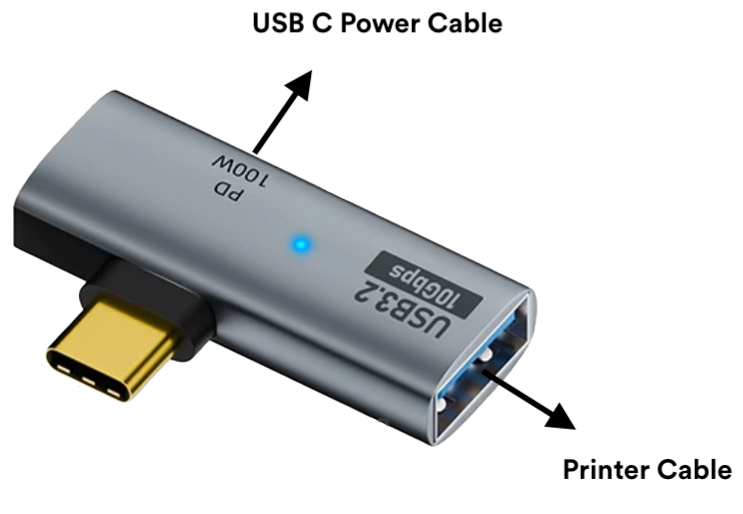
- At this point, all connections are done and you should not be seeing any cables that are left unconnected inside the booth.
- Plug in the power cable at the back of the booth. The printer should be powered on automatically (if not, check the switch inside with labels I & O and flip this switch). The tablet should also begin charging. This is important as you need the tablet to be both charging and connected to the printer so it does not run out of battery when you run it inside your shop or at an event.
- Slide in the tablet carefully with the camera on the left, and the screen facing outwards, from the top of the window of the box.
- Turn on your tablet and complete the tablet setup process. Create a Google account if you don't have one already as it is required to download the Receipt Booth application from the Play Store.
- You're ready to start customising the interface and prints!
Download the application here: https://play.google.com/store/apps/details?id=com.receiptbooth.receiptbooth